Python Notes
Contents
- Interpreter
- Compiler
- Setup
- Keywords
- Variables and Data Types
- Errors
- Naming Convention
- Built-in Function
- Operators
- Conditional Statements
- List
- Set
- Python Exercises
- References
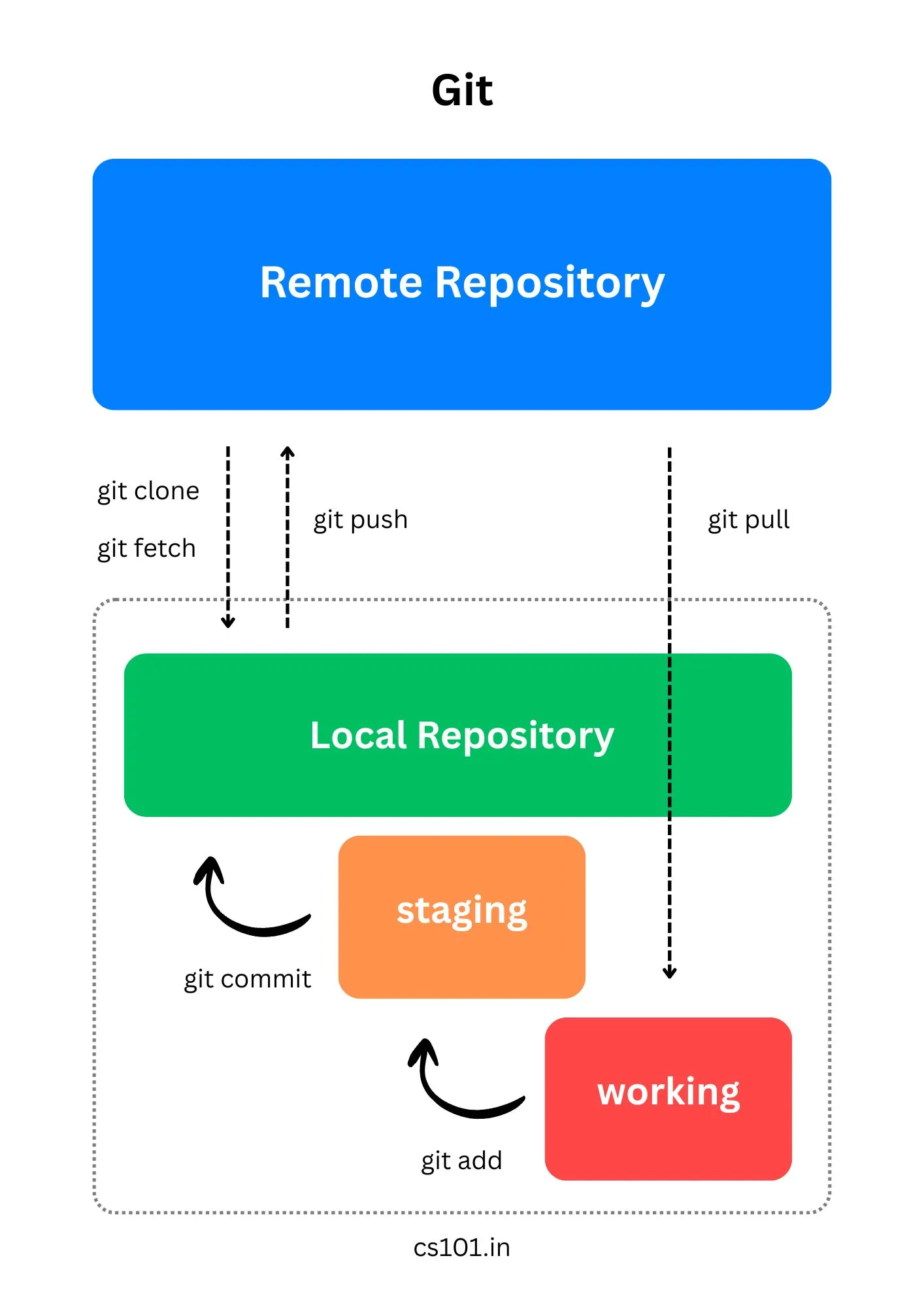
- Git
- Created by ‘Guido van Rossum’ in december of 1989 over christmas holiday.

- Python’s name was inspired by ‘Monty Python’s Flying Circus’.
- Python is an interpreted language. Compiled to a byte-code but still interpreted at execution.
- A compiler translates program from one language into another, (byte-code in java).
- This machine code is then executed, with-out the need for the source.
- Byte-code being native to the hardware it runs gives it time/speed advantage.
- But an interpreter like its literal meaning, translates the program line by line at execution.
- Interpreted at executed at run time has it’s advantages and dis-advantage.
Interpreter
Imagine reding a book written in french without knowing it. You choose someone who knows french to read and translate (interpret) in english for you. Every time you read this book, the interpreter helps you translate it for you. One down side is this interpreter may not match your reading speed as you do on your own.
Compiler
Now imagine reading it with a compiler. Compiler reads and translates whole book. Writes an english version of the book for you. Now the upside of this method is, interpreter don't follow you everywhere. And you can read the book as fast as you can.
Setup
- Download & Install latest version from here Python Release
- Add installation dir to PATH environment variable.
- Download & Install VS Code from here VS Code
- Install Python extension from Marketplace Python Extension
- Open Command Prompt / Terminal and type ‘python’ to verify installation.
- Download and Install Github Desktop Github Desktop
Keywords
to display list of keywords in python use the following statement
import keyword keyword.kwlist
[‘False’, ‘None’, ‘True’, ‘and’, ‘as’, ‘assert’, ‘async’, ‘await’, ‘break’, ‘class’, ‘continue’, ‘def’, ‘del’, ‘elif’, ‘else’, ‘except’, ‘finally’, ‘for’, ‘from’, ‘global’, ‘if’, ‘import’, ‘in’, ‘is’, ‘lambda’, ‘nonlocal’, ‘not’, ‘or’, ‘pass’, ‘raise’, ‘return’, ‘try’, ‘while’, ‘with’, ‘yield’]
Variables and Data Types
- Python Syntax
- Variables
- Data types
- Numbers: int, float
- Text: str
- Boolean: bool
- IO Operations
- input
- Type Conversion
- int, float, str
Errors
- Syntax Errors
- Runtime Errors
- Semantic Errors
Naming Convention
- can contain letters and digits,
- can start with a letter or underscore,
- starting with _ meant for internal use,
- use lower case
- avoid using keywords
- use upper case for const
Operators
- Arithmetic Operators
- +, -, *, /, %, //, **
- PEMDAS
- Parenthesis,
- Exponent,
- Multiplication,
- Division,
- Addition,
- Subtraction
-
Comparison Operators
- gt, lt, ge, le, eq, not eq
-
Logical Operators
- and, or, not
- Membership Operators
- Identity Operators
Conditional Statements
- if elseif else
- for in range
- while
- match case
List
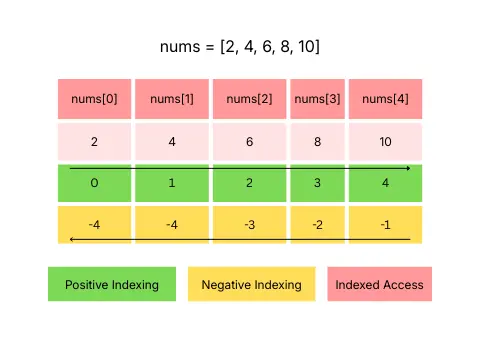
- Ordered collection of data elements
- Zero based index access -> nums[0] = 10
- Iterable
- append, pop, clear, extend, insert, reverse, sort
Set
- Un-ordered collection of unique data elements
- No duplicates are allowed
- Iterable, Mutable
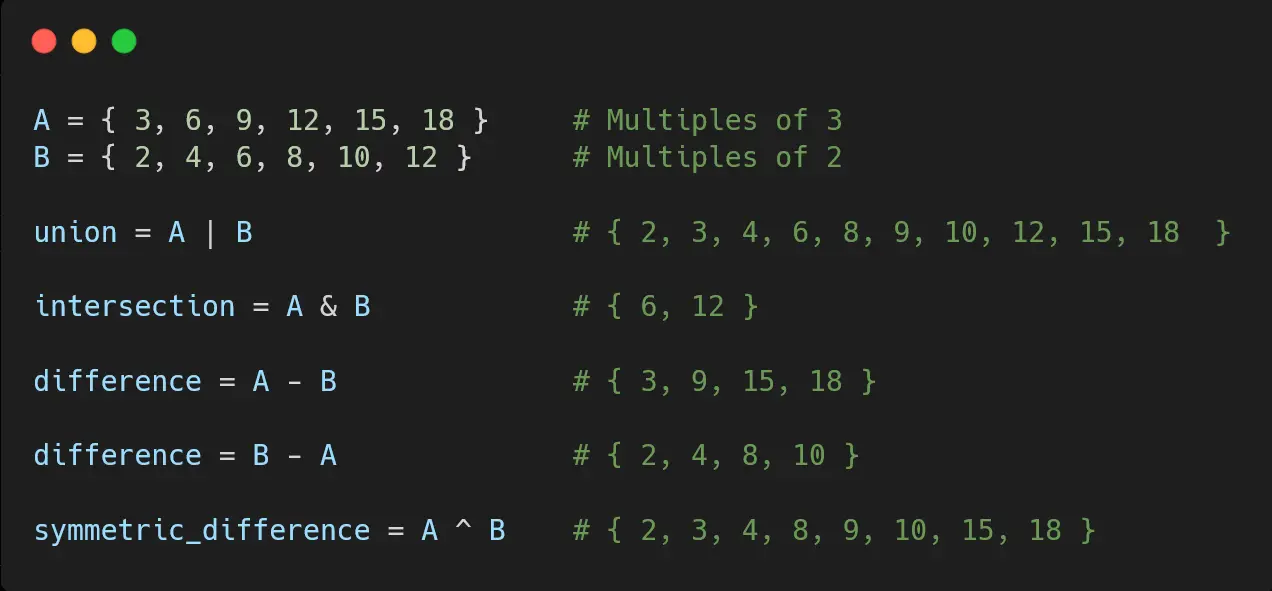
- union, intersection, difference, symmetric_difference, add, remove, clear
- Data elements with-in a set must be immutable
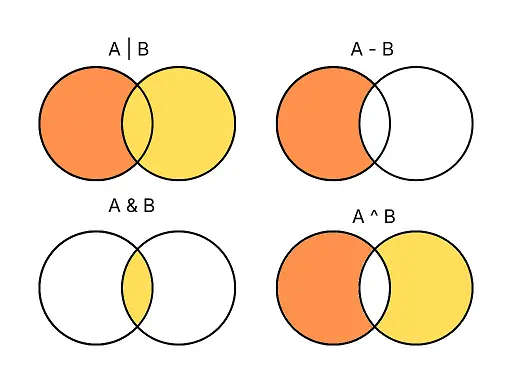
- A | B -> All unique elements from A , B
- A - B -> Elements in A, but not in B
- A & B -> Elements in both A and B
- A ^ B -> Elements in A and B but not in both
References
- Docs - The Python Tutorial
- Book - How to Think Like a Computer Scientist
- Book - Learn Python The Hard Way
- Docs - Git Setup
- Markdown Cheat Sheet
- Git Repo Class Room
Git
    - git clone 'https://github.com/VallarasuS/Vallarasu.in.git'
    - git pull
    - git add *
    - git commit -m "Notes(Python): Day 001 - Data types & Variable"
    - git push origin main