back
Py Selenium
Contents
Schedule
| Day | Date | Topics | Work |
|---|---|---|---|
| Day 001 | 08/DEC/25 | Intro to Computers | |
| Day 002 | 09/DEC/25 | Intro to Programming | |
| Day 003 | 10/DEC/25 | Input & Print | |
| Day 004 | 11/DEC/25 | Input & Print | read & write |
Intro
- Binary Representation, two bit table
- Binary Addition, Adder
- Gates, Adder
- Components of Computer, CPU, RAM, HDD
- CPU, ALU, Registers IO, Memory
- RAM Address Space
- Simple Add instruction
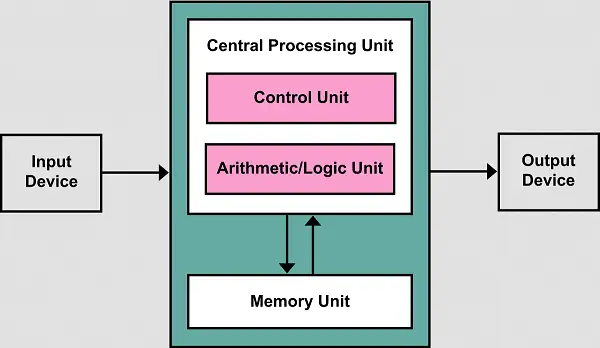
- Von Neumann architecture
Setup
- Install PyCharm by jet brains or VS Code by Microsoft
- Download & Install latest version from here Python Release
- Add installation dir to PATH environment variable.
- Download & Install VS Code from here VS Code
- Install Python extension from Marketplace Python Extension
- Open Command Prompt / Terminal and type ‘python’ to verify installation.
Introduction To Computers
Von Nuemann Architecture
Introduction to Programming
- Data vs Instructions
- Data
- Primitive
- Non Primitive (Collection / Arrays)
- Instructions
- OOPS
- Procedural
- Functional
- Functions
- Pre defined
- User defined
- Introduction to Python
- History
- Python 2 vs 3
- Interpreted vs Compiled
- Script mode vs Interactive Mode
Input and Output
- Save python file  \<file_name\>.py
- Run code using: py file_name.py \| python file_name.py \| python3 file_name.py
- Input Syntax, Return type str, -> input("enter your name: ")
- Print Syntax, Return type None, -> print("Hello World!")